> ## Documentation Index
> Fetch the complete documentation index at: https://docs.vantedge.run/llms.txt
> Use this file to discover all available pages before exploring further.
# Workspaces
> Project containers that organize resources within your organization
## What are Workspaces?
Workspaces are **project containers** within your organization that provide resource isolation and team collaboration boundaries. Think of them as dedicated environments for specific projects, applications, or deployment stages.
## Key Benefits
**🔒 Resource Isolation**
Resources in different workspaces are completely separate - no cross-workspace interference.
**🏗️ Project Organization**
Group related deployments, experiments, and configurations in logical containers.
**👥 Team Collaboration**
Share workspaces with specific team members and assign granular permissions.
**🔄 Environment Separation**
Use different workspaces for development, staging, and production environments.
## Workspace Structure
```
Organization: "AI Startup"
├── Workspace: "Model Training"
│ ├── Kubernetes clusters for training
│ ├── Experiment configurations
│ └── Training datasets and secrets
├── Workspace: "Production API"
│ ├── Model deployment services
│ ├── AI gateways for traffic routing
│ └── Production monitoring and alerts
└── Workspace: "Research & Development"
├── Experimental models
├── A/B testing configurations
└── Prototype deployments
```
## Workspace Types
### Default Workspaces
* Every organization has **exactly one** default workspace
* Personal orgs: "Personal" workspace
* Team orgs: "Default" workspace (can be renamed)
* Cannot be deleted (organization safety)
### Project Workspaces
* Created manually for specific projects
* Custom names and descriptions
* Can be deleted when no longer needed
* Full team collaboration features
### Environment Workspaces
* Separate workspaces for different stages
* Common pattern: dev/staging/production
* Isolated secrets and configurations
* Different access controls per environment
## Workspace Roles
| Role | Create Resources | Manage Secrets | Add Members | Delete Workspace |
| ---------- | ---------------- | -------------- | ----------- | ---------------- |
| **Viewer** | ❌ | ❌ | ❌ | ❌ |
| **Member** | ✅ | ✅ | ❌ | ❌ |
| **Admin** | ✅ | ✅ | ✅ | ❌ |
| **Owner** | ✅ | ✅ | ✅ | ✅ |
## Managing Workspaces
### Workspace Overview
The Workspaces page shows all your available workspaces with key information:
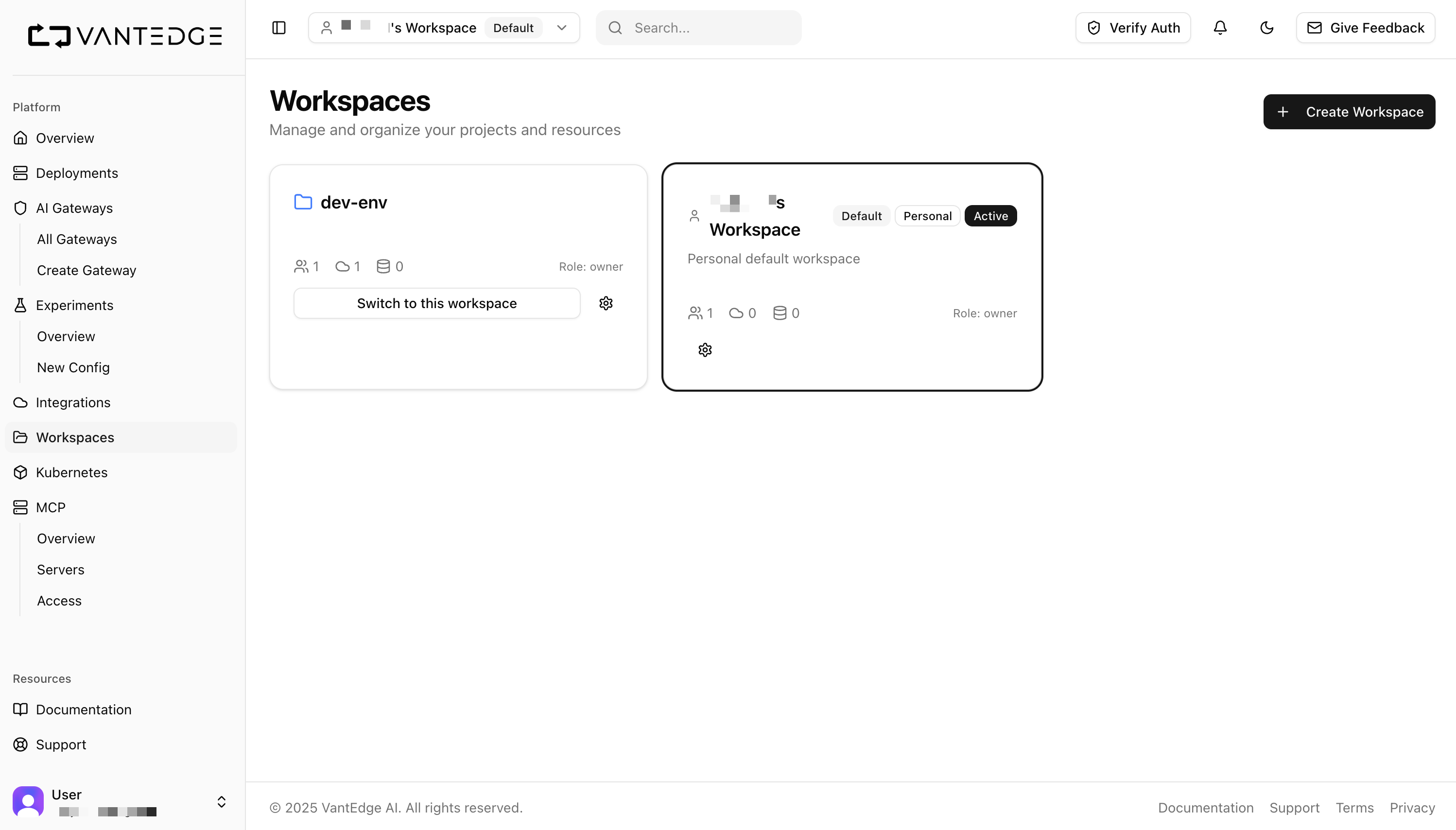 Each workspace card displays:
* **Workspace name and type** (Default, Personal, Active)
* **Member count** and your role (owner, admin, member, viewer)
* **Resource counts** (integrations, clusters, etc.)
* **Quick actions** (switch workspace, settings)
### Workspace Settings
Click the settings icon to manage workspace configuration:
Each workspace card displays:
* **Workspace name and type** (Default, Personal, Active)
* **Member count** and your role (owner, admin, member, viewer)
* **Resource counts** (integrations, clusters, etc.)
* **Quick actions** (switch workspace, settings)
### Workspace Settings
Click the settings icon to manage workspace configuration:
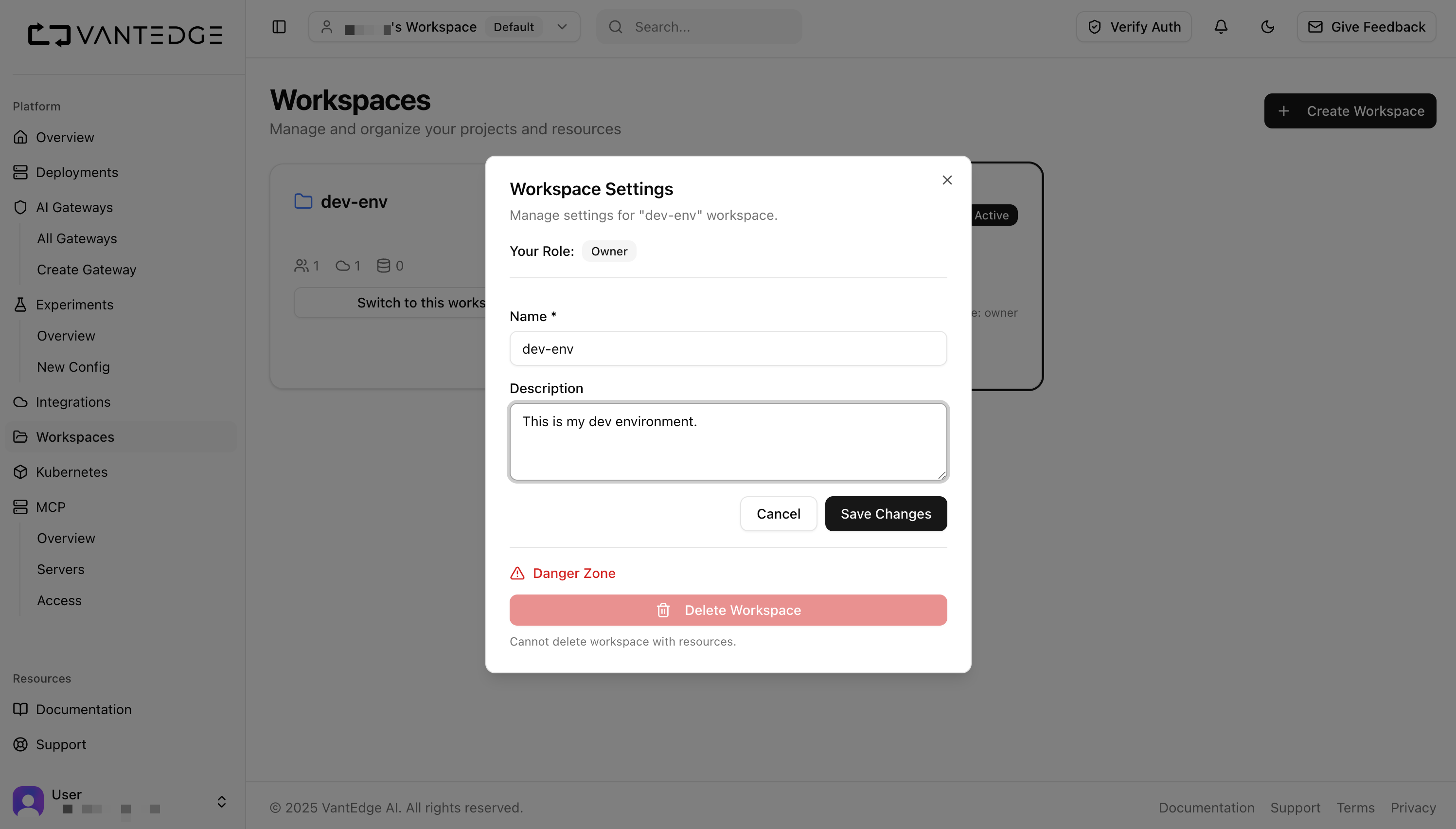 **Available settings:**
* **Name and Description**: Update workspace details
* **Member Management**: Add/remove team members
* **Danger Zone**: Delete workspace (only if no resources exist)
## What Goes in a Workspace?
**Deployments**
* AI model deployments on Kubernetes
* Web applications and APIs
* Microservices and containers
**Infrastructure**
* Kubernetes clusters (dedicated or shared)
* AI gateways for traffic management
* MCP servers for AI protocols
**Configuration**
* Experiment definitions and A/B tests
* Environment-specific secrets
* Deployment configurations
**Monitoring**
* Performance metrics and alerts
* Resource usage tracking
* Error monitoring and logging
***
Workspaces provide the organizational structure that makes complex AI projects manageable, secure, and scalable across your team.
**Available settings:**
* **Name and Description**: Update workspace details
* **Member Management**: Add/remove team members
* **Danger Zone**: Delete workspace (only if no resources exist)
## What Goes in a Workspace?
**Deployments**
* AI model deployments on Kubernetes
* Web applications and APIs
* Microservices and containers
**Infrastructure**
* Kubernetes clusters (dedicated or shared)
* AI gateways for traffic management
* MCP servers for AI protocols
**Configuration**
* Experiment definitions and A/B tests
* Environment-specific secrets
* Deployment configurations
**Monitoring**
* Performance metrics and alerts
* Resource usage tracking
* Error monitoring and logging
***
Workspaces provide the organizational structure that makes complex AI projects manageable, secure, and scalable across your team.